In 2019 I sold our old Alumacraft canoe to get two kayaks instead. It was sort of sad to see that old friend go. But it was purchased by a woman who worked for the Three Rivers Park District. I knew it was going to get way more use from her, so that made me happy.
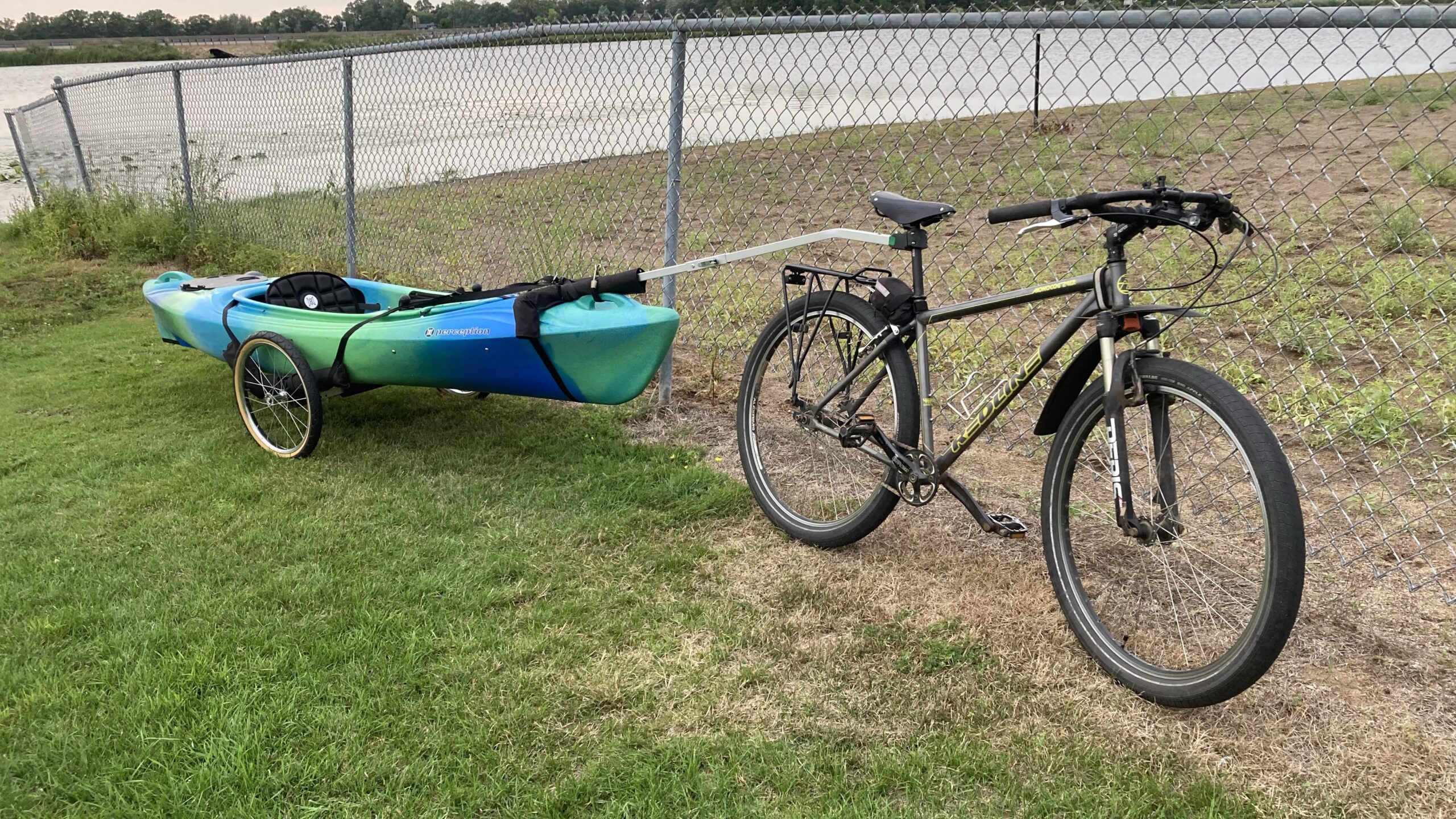
In my shed I still had my canoe trailer for my bike, what should I do with that? An email to Wike revealed all I needed to carry a kayak with it instead was a different width crossbar. I made some measurements and ordered a new crossbar so I could keep the trailer for the ‘yak. Here’s how I tow my new Perception Joyride kayak:
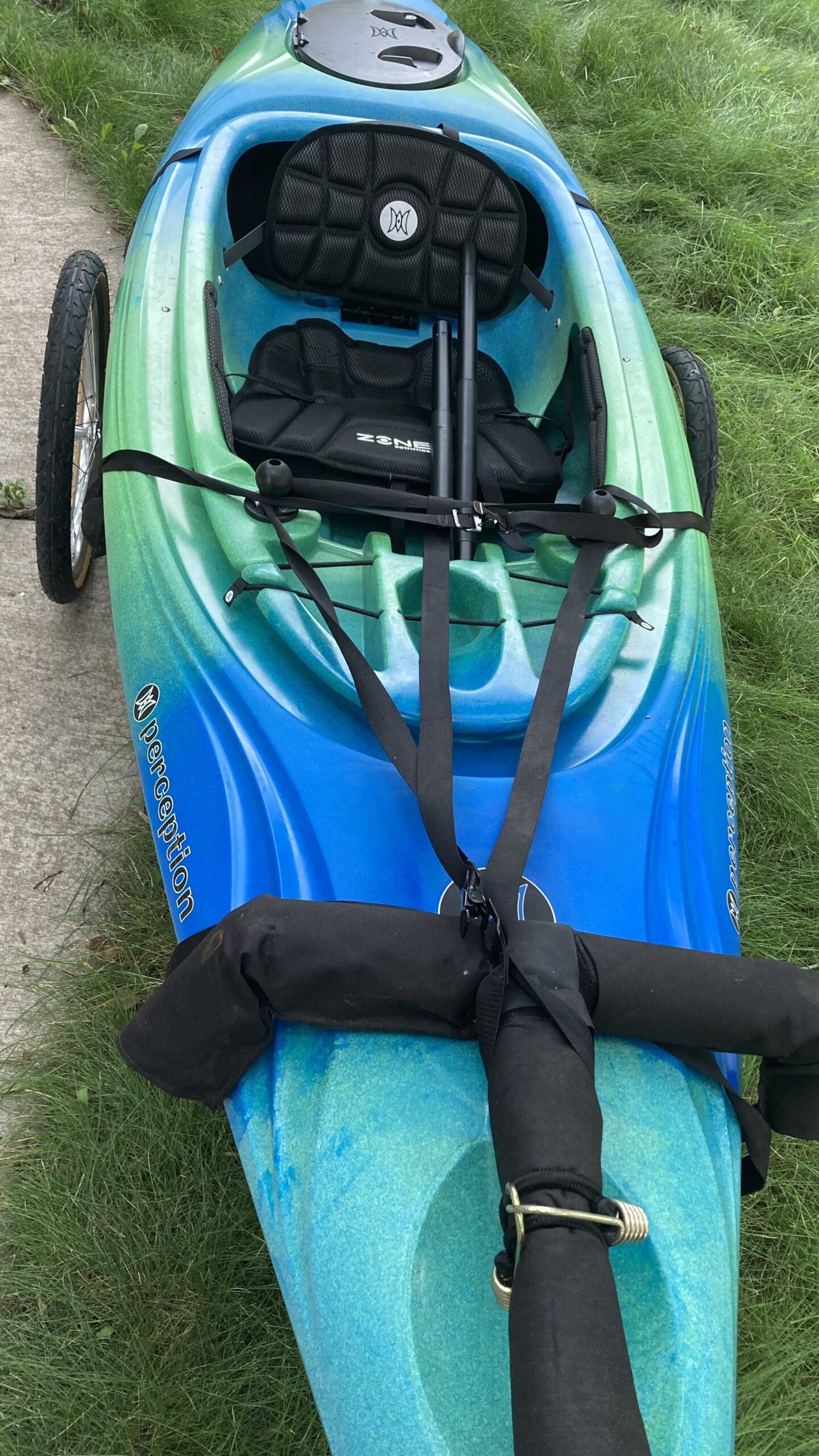
This kayak uses perception solo mounts for ram accessories like fishing rod holders. They’re two large screw-in ball mounts. There’s an interesting side-effect of using these mounts – the ball serves as a rigging point for the Wike trailer straps.
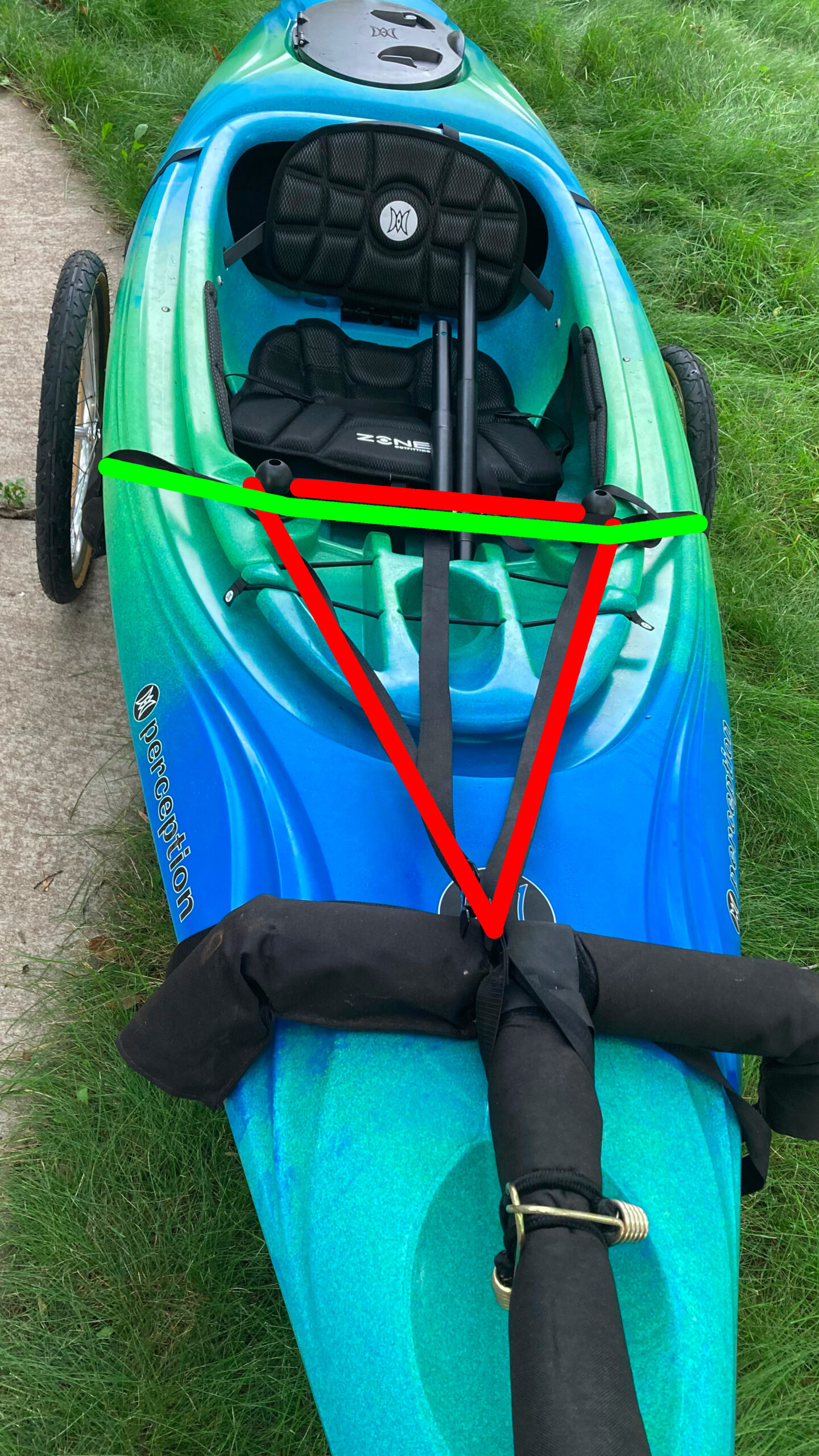
The best rigging setup I found is illustrated below. The wike towing tee has a strap that would normally hook up to a canoe seat, but instead I run it around the solo mounts (shown in red). Then the straps from the cart go over and in front of the solo mounts, securing the tee strap in place (shown in green).
One of the most important pieces of this setup is a third strap that is not provided by Wike, from their site:
A third line (you must provide) from the bow ties to the post of the ‘T’ to keep the front of the canoe kayak from tilting up or down.
I used a small bungee to go around the beefy perception handle at the front and secure the Wike tee to the front of the boat. It seems to be at the perfect angle where the back of the boat doesn’t touch the ground, and the tee is at an angle where it doesn’t interfere with my bike rack.
Death wobble ☠️
One issue I have yet to solve is a fish-tail that seems to happen when I’m going very slowly uphill. It seems the cadence of my pedaling while standing, and perhaps the sway of the bike combined with the short length of the boat create a feedback loop. What happens is the nose of the kayak starts to turn left and right. Then the feedback begins and it starts turning more and more, as my pedaling seems to amplify the effect 😲
Death wobble is a misnomer – nobody died. It only happens when I’m going up a hill at 4-5MPH. I only describe it as death wobble because the sensation can be a bit unnerving.
The solution might be to stay seated as long as possible and adjust my cadence. Maybe I could load the kayak to put a little more weight on one end? If you have any ideas, comment below and I’ll try ’em.
People have tons of questions about owning and driving an electric vehicle (EV). There are also a bunch of people that nay-say and make assumptions about EVs without first hand experience.
I look at the new Ford F-150 Lightning as a truck of the future. The base model is around $40k, it has a 230 mile range, and can tow 11,000 lbs.
You’re not going to get 230 miles range while towing.
Well duh! We have a Highlander Hybrid that gets 24-27MPG normally but when it’s pulling a boat it gets 10-12. Towing cuts the effective range of any vehicle to about half. Anyone that thinks it would be otherwise is fooling themselves. Why is this such a surprise?
There’s another article covering the same topic that’s much more click-baity. The bottom line is, no matter if you’re using petroleum or electricity, towing reduces range. The Denali they used gets up to 20MPG (unladen). It was getting 9MPG while towing. The difference is the Denali has a 24-gallon tank, putting the range between 216-480 miles – towing and unladen. Range is still (equally) greatly reduced, but the longer starting range of the Denali provides a greater range cushion.
It’s not going to get me to my mother-in-law’s house in rural North Dakota
Again, you’re probably right, but how often are you actually going there? In 2022 I did one road trip that was longer than the total range of my electric vehicle. You know what I did? I took the van. Most couples/families have two cars. Even if both were full electric, you could rent a gasoline car if you’re driving to BFE where there are no charging stations. Guarantee the money you saved on fuel the rest of the year would cover your rental.
EVs don’t charge fast enough
This complaint is only valid on road trips (see above) and how many are you taking a year? I’ve driven my Chevy Bolt EV to Chicago multiple times and it is one of the slowest charging EVs – accepting a max of 53kwh. It takes about 45 mins to recharge so I plan my charging stop around my lunch break. Literally every other EV out there charges faster. Without experience, you have nothing to complain about. 99% of the year it will charge in your garage and be fully ready to use every morning. When was the last time your gasoline car did that?!?
When we moved back to Minnesota and started looking at houses before Jules was born, my realtor took us to a house in Fridley. I was dead against the place before we even arrived because I had mentally determined it was too close to my parents house.
I don’t know if our realtor did this on purpose or not, but he approached the house from the east (a route I wouldn’t have chosen), which showed that just down the hill is a lake.
There’s something in my lizard-brain that made me not hate the house because of its proximity to the lake and to my parents (for childcare reasons). I swallowed my pride and we bought it.
I wound up buying my parent’s canoe in hopes we’d launch on the lake nearby, but canoeing is an activity that is better with at least two people. Convincing my family to go was rare 🛶 So we sold the canoe and got two kayaks from Menards.
Those kayaks were fine, but eventually I wanted one with a couple of extra fishing features, without going to a full fishing kayak – because sometimes I like to just paddle around and sometimes I want to fish.
Finally the price listed was “view price in cart” so I did and checked out, saving almost $200 off the regular price.
How is it?
Construction, like the Swifty, is very sturdy. The handles are molded into the boat so they’re indestructible. For car transportation, I’d normally use the handle eyelets to run an extra strap to the rear hitch. The handles are too big for my normal strap hooks. I’ll have to add some rope or something. Bringing it home from the store was unnerving because the van has no sunroof and normally the handle strapping is what lets me know the kayak is still up there.
What I sort of forgot was that to equip fishing rod holders, I’d be investing another $100 in ram mount equipment. If you just want a couple of holes to drop your rod into, the Swifty and Mustang options are good choices.
The boat itself is great. It tracks very nicely. Strangely there’s no drain plug like on my cheapo Menards rig, so when the cockpit gets rain inside, it can be tricky to dump. I got a huge car wash sponge from Walmart to assist. I’ll likely buy a cockpit cover to keep water out during storage.
The back compartment is completely sealed from the cockpit, which is nice. In my old kayak any water inside the boat was going to get to the back too.
New Paddle Too
Like the kayak itself, I over-analyzed what to get. Deciding on length seemed to be the hang-up. I found this Paddling.com article to be helpful.
But there are several ways to measure. My torso is 30.5″ which calls for 210-230cm. My height is 5’10” and the boat is 29.5″ wide which calls for a 240cm paddle.
Having spent too much money at Dick’s on the kayak, I had a $20 reward to put towards a paddle. The Vibe Journey Paddle is the one that is in stock at every store, and it was on sale for $37 so I could get it for less than $20 with my reward. But it only comes in 230cm 🤔
Ultimately it didn’t matter because compared to the hardware store paddle I had, it was larger. 😎
On the water
On the lake it tracks very nicely. Not that the Menards one was bad, but this is clearly a step up. It’s got a nice place to hold my phone (put it in a dry bag!) and a water bottle, plus an indent to rest the paddle.
The problem that I have is not with the kayak, it’s with my nearest waterbody. I wish is that Moore Lake wasn’t bisected by a state highway 😞 It’s so easy to go down there, but it’s not as relaxing as it could be. The noise from the cars nearby is unrelenting. It’s especially bad if you want to go for a quick paddle after work, when everyone is battling their way through rush hour.
In April of 2022 my VOIP home phone stopped receiving incoming calls. I could still dial out, but nobody could call the house. I received warning emails from Skyetel every 3 hours that my SIP endpoint was unreachable by their servers.
Since nothing had changed on my end, I suspected that something changed with my provider: Comcast/xfinity. Similar to my experience with British Airways, I found that xfinity has now automated everything.
I understand that automation helps if someone just needs to reboot their router, or forgot their wifi password. But for those who need genuine help getting shit done, it presents a huge barrier. It took me 9 calls and 3 trips to the xfinity store to get this resolved…
I phoned tech support to explain that port 5060 (for SIP service) was being blocked on my connection.
The first guy I talked to said they won’t open up that port unless I subscribe to xfinity’s VOIP service. Honestly, I didn’t want to talk to this guy anymore. He was obviously from India. No offense, but he sounded more like a scammer than a helper. I wanted to talk to someone who actually works for xfinity in the US, that actually knows how their network is set up. Before I hung up I got the phone number for Advanced Technical Support. It’s 888-780-8571. You’re welcome.
I called that number and magically wound up speaking with an actual technical rep based in these United States. BTW, this won’t happen every time – I’ve yet to figure out what automation magic I did to skip past the overseas nonsense.
When I mentioned my issue he referenced this page https://www.xfinity.com/support/articles/list-of-blocked-ports which I had also been looking at, noting that port 5060 isn’t in the list. He said I might need to do some configuration in my modem’s settings to forward that port.
But the Netgear CM1000 isn’t a combo modem/router. It doesn’t have a firewall or port forwards or anything. It just passes all connections on to my OpenWRT router which has firewall/forwarding/wifi/etc.
So the tech guy suggested I try an xfinity-supplied cable modem (at a rental fee of $15/mo) to see if that solves the problem. I wasn’t thrilled with the extra cost, but he said it’s pro-rated and might be worth seeing if it fixes the problem.
Approach 2 (playing the game)
So I went into my nearest xfinity store, went home with a new cable modem, and set it up. Then, to my dismay, when I went into the port forwarding settings on the modem, I consistently got this error:
I called technical support back and they said:
You need to go back to the xfinity store and get a different modem that is supported by the xfinity app. I’ve made a note on your account so they’ll give you the correct one this time.
WTF. OK, so I went back and returned my modem for another one. The new one worked with the app. I did have to do some weird things like disable IPv6 on my router so that it would show up in the xfinity app as an available device and port-forward destination because xfinity only supports port forwards via IPv4.
What’s really going on?
After configuring the router and updating my IP at Skyetel, it seemed to work 💪 Our home phone now rings after dialing. I called xfinity tech support again to re-activate my Netgear CM1000 to see if it will continue to work. Hey – it worked… But why?
My hunch is that by selecting a port forward in the app, something else is getting configured in their network to allow incoming connections – something upstream from your rental router. We’ll see how long the setting lasts before I have to go (temporarily) rent one again 🤞 Also – I was able to reactivate IPv6 in my router without issue.
The next day, the phone rang and it was music to my ears! ☎️ It was my daughter’s friend and they made plans to get together. Then the day after that, I received my first spam call 😱
Holy 💩 y’all – I just spent two weeks not being able to share my screen on Ubuntu. It started with a regular system update that I think updated Wayland. I noticed that my fonts in certain applications looked sharper – likely meaning that the 4k scaling was working better. Then I noticed that zoom wouldn’t share the whole screen, it would just share a portion. 😩
To be clear about my setup, I was running Ubuntu 20.04 LTS with a dual monitor setup. I had been using Wayland because my XPS built-in screen is 4k and my external is standard HD (1080p).
As luck would have it, Ubuntu 22.04 LTS was recently in my update queue, and I figured it couldn’t get much worse. So I upgraded, but (womp womp) it didn’t help.
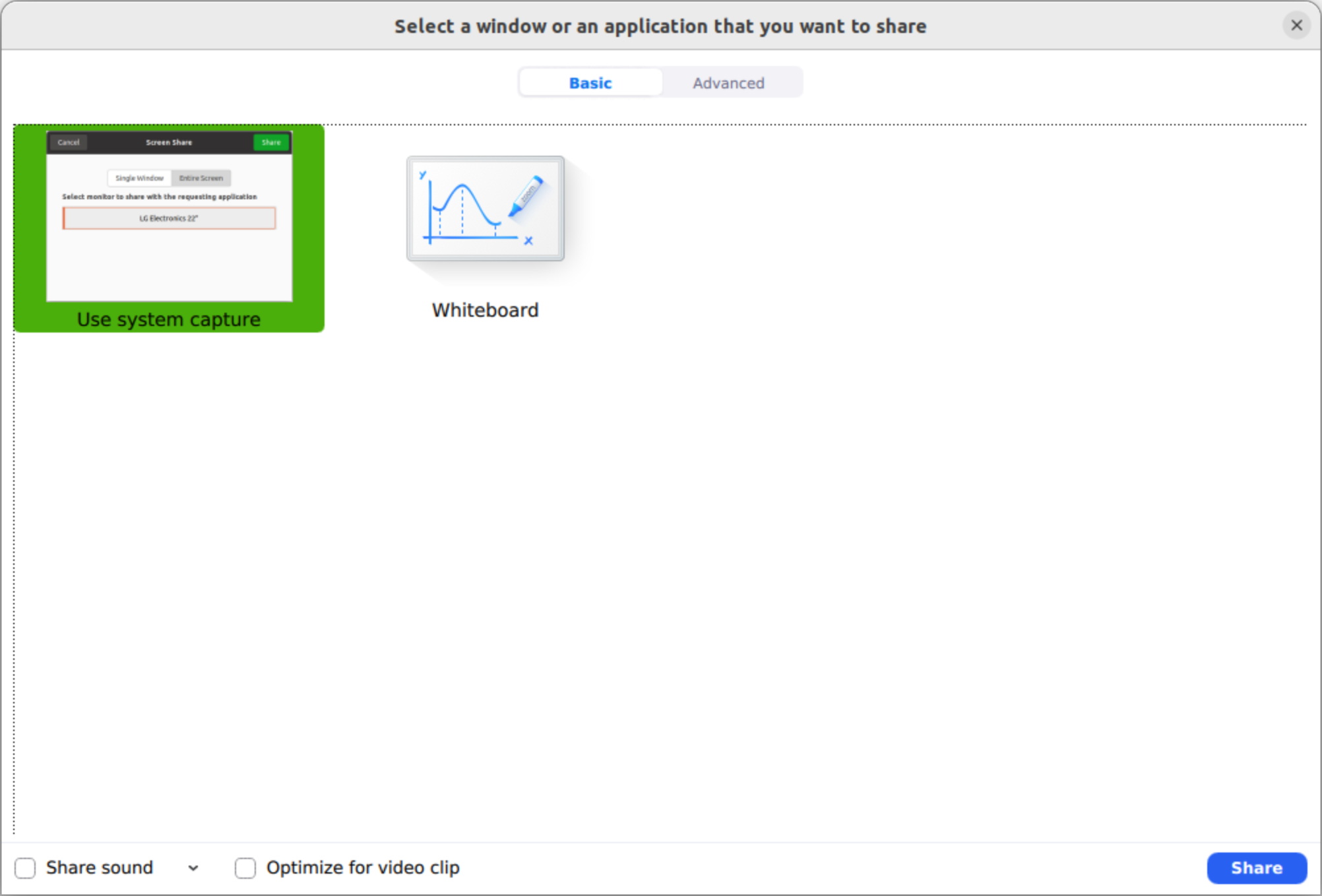
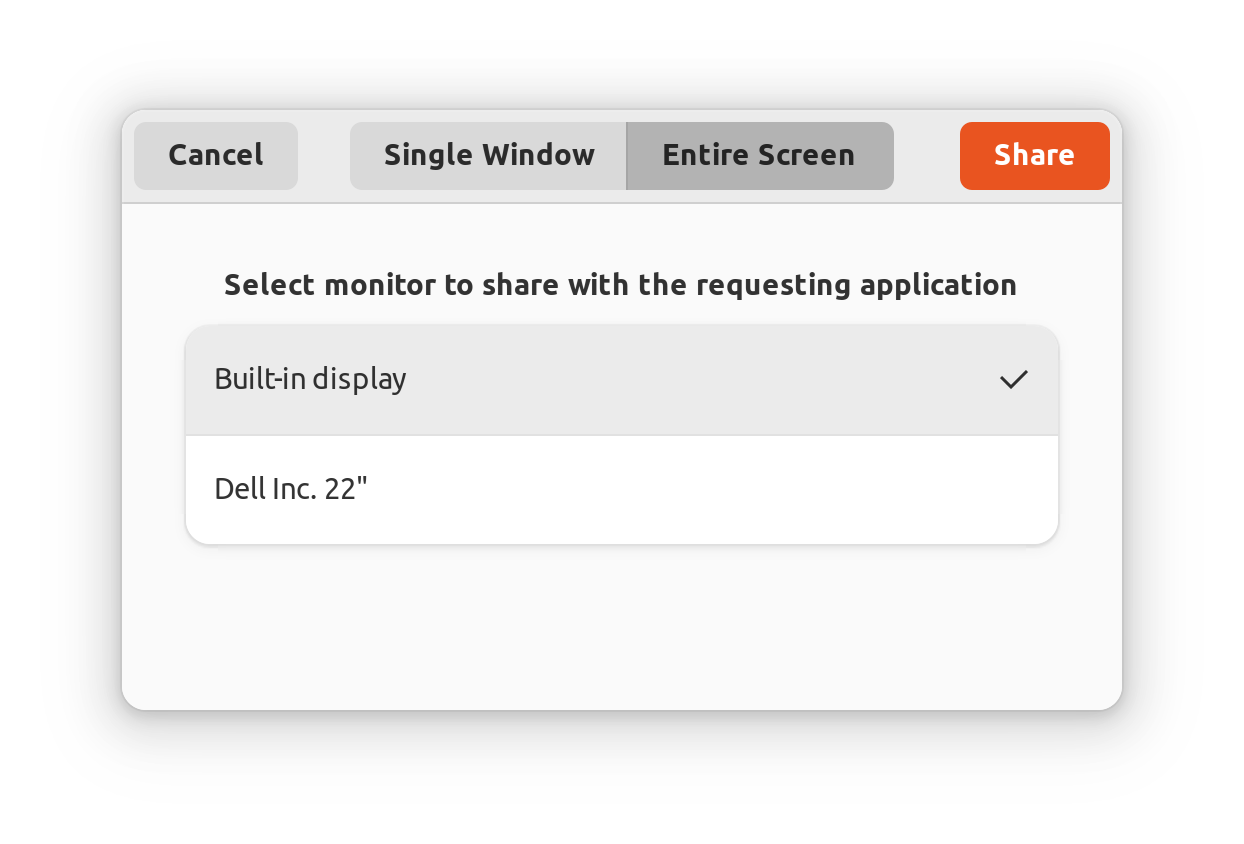
Now zoom wouldn’t show a normal screen sharing option, but it had a new “System Capture” selection.
The system capture selection would bring up another new prompt:
But after I clicked “Share” nothing would happen. People on the other end would just see a black screen.
PipeWire Debugging
After some research it seems that the new sharing subsystem for Wayland is called PipeWire. In my quest to debug it end-to-end I found this handy guide for debugging screen sharing in Wayland, the “It doesn’t work” Troubleshooting Checklist.
One of the steps is to check the pipewire service itself:
systemctl --user status pipewire
And mine was up-and-running but was returning this warning in yellow:
Yes it was for a different distro (Slackware) but one of the pieces of advice seemed sound:
Long story short, remove every little file from /etc/pipewire if exists and reboot the system.
I’m not sure why the folder was there with an old config file in it. Likely from when I was on 20.04 and tried upgrading PipeWire to try to fix zoom (which didn’t work).
I deleted that folder (actually moved it to a temporary place first), rebooted and it did the trick. Screen sharing is back on! Good thing because my job depends on it 💪